
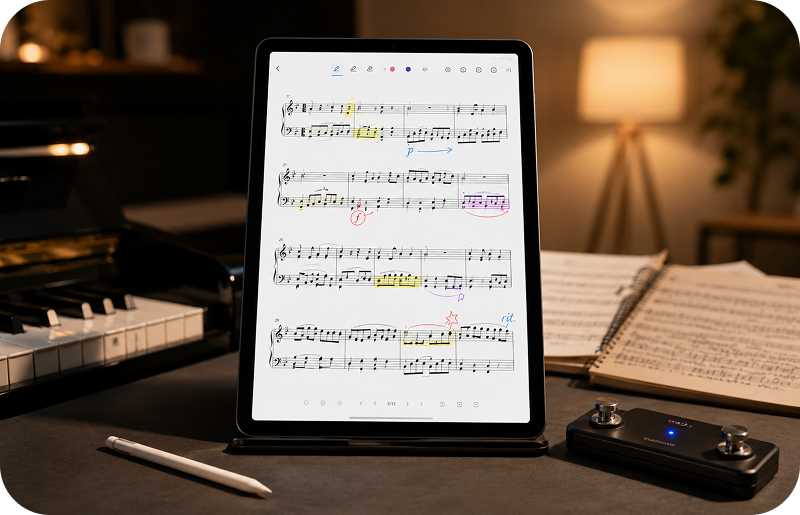
Why annotate sheet music?
Annotations help musicians personalize their scores with notes, reminders, fingerings, dynamics, rehearsal marks and other performance instructions.
Instead of writing directly on paper copies, many musicians now prefer digital annotations on PDF sheet music using tablets and smartphones.
Annotate PDF scores on Android
Android tablets and phones can be used to read and annotate digital sheet music in a practical and portable way.
- Write notes on PDF sheet music
- Add highlights and visual markings
- Prepare scores for rehearsals and concerts
- Keep annotations together with your digital scores
- Reduce the need for printed paper copies
Use Xodo PDF Reader for advanced annotations
GoScore can work together with Xodo PDF Reader to provide a powerful annotation workflow for PDF sheet music on Android.
If you want to learn how this integration works, read the guide about using Xodo PDF Reader with GoScore.
Digital annotations for practice and study
During practice sessions, annotations can help musicians remember difficult passages, tempo changes, phrasing and technical details.
Teachers and students can also use annotations to add instructions and study notes directly on the score.
Use annotations during live performance
Digital annotations are also useful on stage. You can highlight important passages, mark transitions or add reminders for rehearsals and concerts.
If you perform live, you may also want to organize your repertoire. Learn more about how to manage setlists for musicians.
Many musicians also use a Bluetooth page turner pedal together with annotated PDF scores during rehearsals and concerts.
Read and organize annotated PDF sheet music
Annotations become more useful when they are part of an organized digital music library.
GoScore helps musicians read and manage PDF sheet music on Android devices while keeping scores easy to access for practice and performance.
Discover more about using a PDF sheet music reader for Android.
Keeping annotations connected to an organized music library helps musicians work more efficiently during practice and performance. Discover how to organize digital sheet music.
Annotate scanned paper sheet music
If your music collection still includes printed scores, you can scan them, convert them to PDF and then add annotations digitally.
Read more about how to scan sheet music and convert it to PDF.
Build your digital music library
Many musicians combine scanned scores, downloaded PDFs and annotated files into one organized digital sheet music collection.
You can also discover how to search PDF sheet music online using legal and reliable sources.
GoScore: annotate and manage sheet music on Android
GoScore is designed for musicians who want a practical way to read, organize and annotate PDF sheet music on Android tablets and phones.
Whether you practice at home, teach music or perform live, GoScore helps you keep your digital scores and annotations always available.
Discover all features of GoScore for Android.
Conclusion
Digital annotations can make studying, rehearsing and performing with sheet music easier and more organized.
With GoScore, you can annotate PDF sheet music directly on your Android device and keep your music library ready wherever you go.